Unlock the Full Power of True Lock Tuner

Start free. Upgrade when you’re ready to take your playing further.

👉 Upgrade to Pro inside the app

TAKE YOUR PLAYING FURTHER

More Than Just a Tuner

True Lock Tuner Pro gives you the tools to explore new sounds, build consistency, and get more out of every practice session.

ALTERNATE TUNINGS

Unlock New Sounds

Break out of standard tuning and experiment with new tones and styles.

  • Drop D
  • Open G
  • DADGAD
  • And more

PRO METRONOME BREAKDOWN

Here’s a clear and complete breakdown of the Pro features for the metronome in True Lock Tuner (Guitar Tuner – True Lock Tuner).The free version includes a basic metronome with adjustable tempo (40–240 BPM) and tap tempo.
Upgrading to Pro (one-time purchase of $4.99) unlocks the Advanced Metronome Features.

PRO METRONOME FEATURES

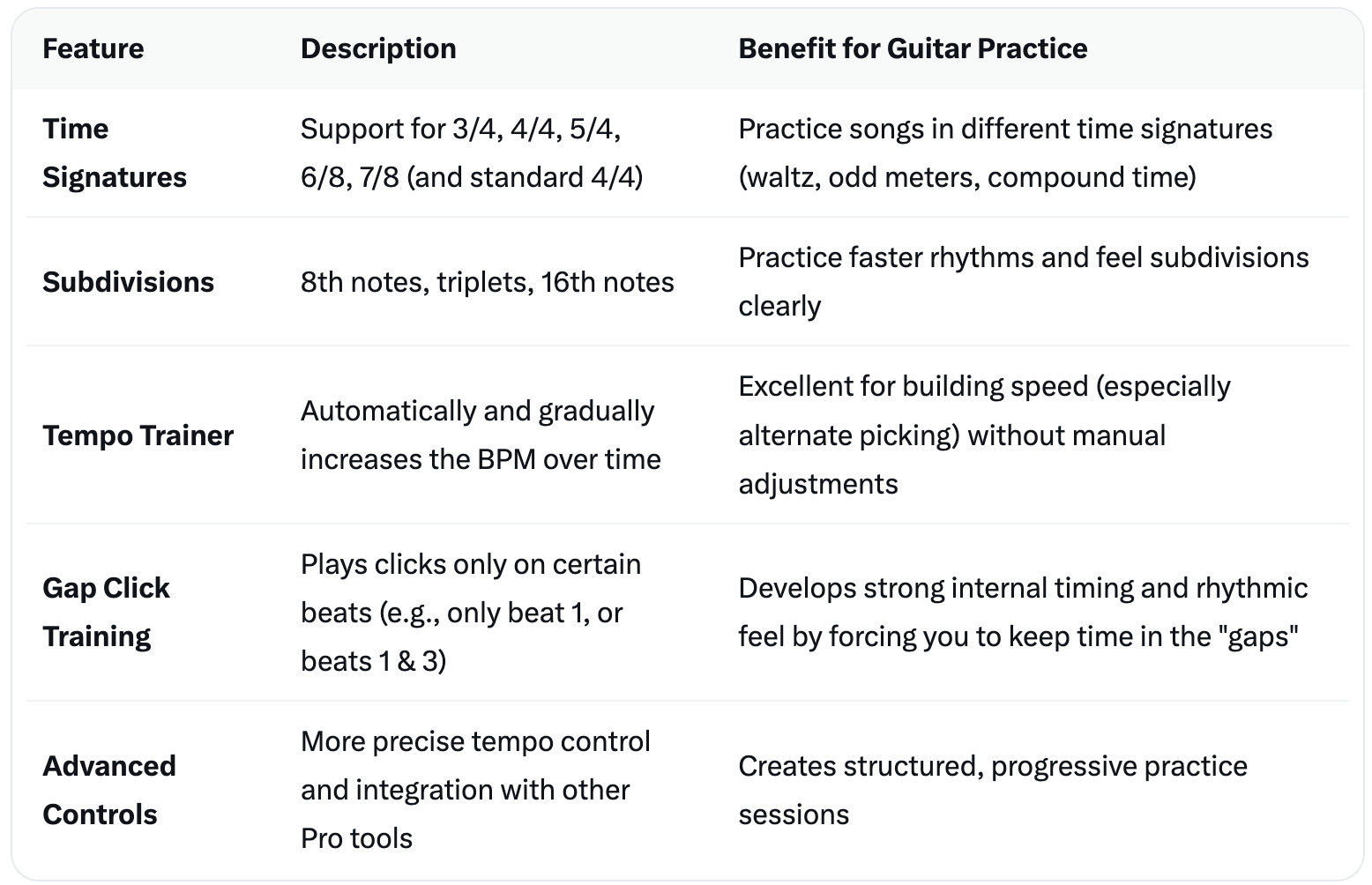
pro metronome features

Quick Summary of What Pro Adds to the Metronome

  • Time Signatures — Go beyond basic 4/4.
  • Subdivisions — Hear and practice 8ths, 16ths, and triplets.
  • Tempo Trainer — The automatic speed-building mode we’ve been discussing (gradual BPM increases).
  • Gap Click — A powerful tool for improving your sense of pulse and timing independence.
These features turn the simple metronome into a much more effective practice tool, especially for speed work, rhythm guitar, and developing better timing.

ADVANCED PRACTICE

Practice With Purpose

Go beyond basic practice and build real consistency.

  • Expanded metronome controls
  • Advanced rhythm options (future-ready)
  • Better practice workflow

CHORD TOOLS

Play More. Learn Faster.

Access tools that help you move between chords and improve your playing.

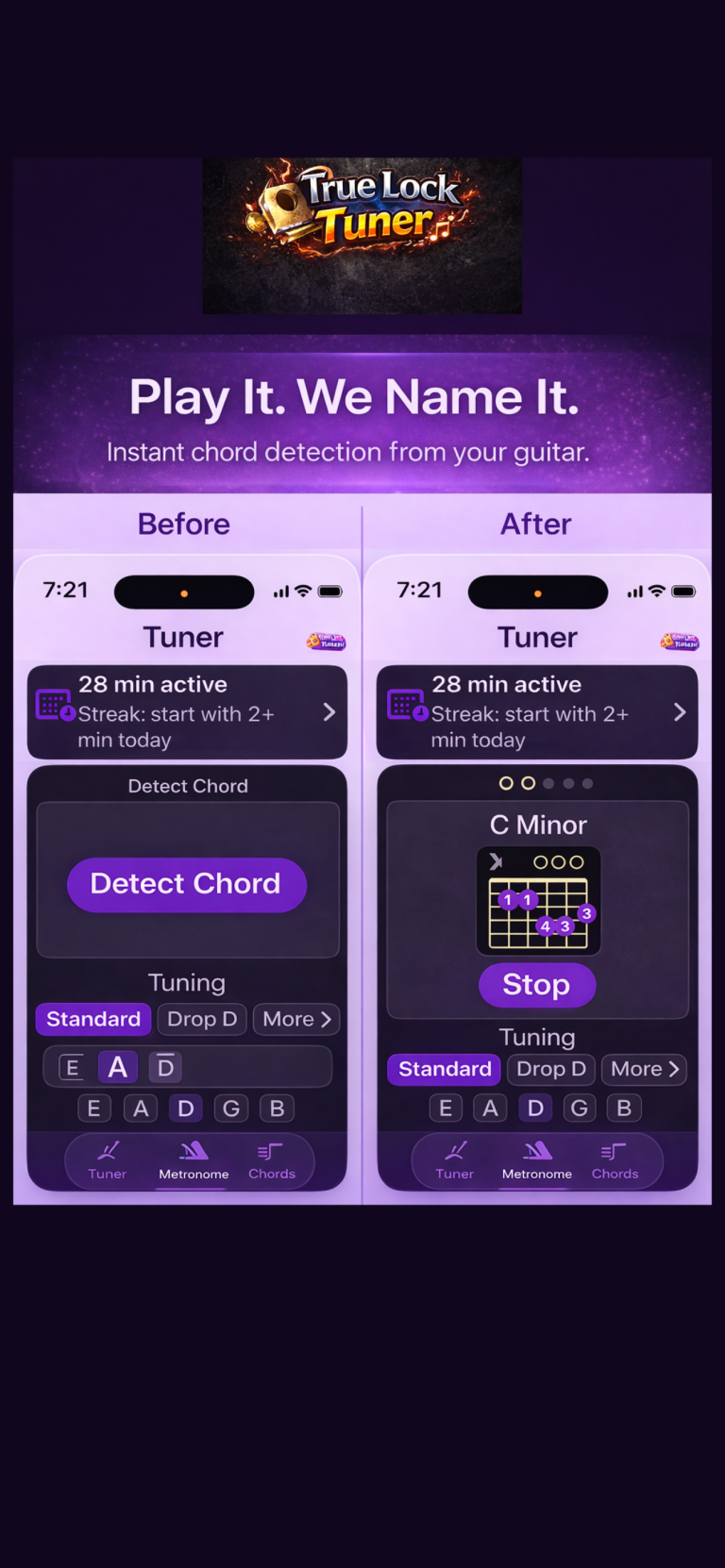
Detect a Chord" (Live Chord Detection)
detect chords

What is Live Chord Detection?

This is a Pro-only feature. It allows the app to listen to your guitar in real time through your iPhone’s microphone and automatically identify the chord you are playing.

Instead of you guessing “Is this a G major or something else?”, the app detects and displays the chord name on screen as you strum or play.

How It Actually Works (Step-by-Step)

  1. Open the Chord Detection mode (in the Pro version)
  2. Grant microphone permission (if not already done)
  3. Play a chord on your guitar — strum it normally or arpeggiate (pick the notes one by one).
  4. The app listens using the phone’s microphone.
  5. It analyzes the sound in real time:
    • Detects the individual notes that are ringing.
    • Compares the combination of notes to its chord database.
    • Displays the most likely chord name (e.g., C Major, Am7, D7, etc.).
  1. You get instant visual feedback — the chord name appears clearly on the screen.

Tips for Best Results


  • Play the chord cleanly — let all the strings ring clearly.
  • Strum steadily rather than very fast or muted strums.
  • Hold the chord for 1–2 seconds so the app has time to analyze it.
  • Keep your iPhone reasonably close to the guitar (about 30–50 cm / 1–1.5 feet away works well).
  • A quiet environment gives more accurate detection (background noise can confuse it).
  • It works better with acoustic guitars or clean electric tones. Heavy distortion can reduce accuracy.

What It’s Good For

  • Checking if you’re fingering a chord correctly.
  • Learning new chords by trial and error.
  • Figuring out chords while learning songs by ear.
  • Practicing chord transitions (see if the app correctly identifies each new chord).

FREE VS PRO

Start Free. Upgrade When You’re Ready

Free Version:

  • Chromatic tuner
  • Standard tuning
  • Basic metronome
  • Clean everyday tools

Pro Version:

  • Alternate tunings
  • Expanded practice tools
  • Chord tools
  • Advanced features

PRICING

Simple, One-Time Upgrade

No subscriptions.
Unlock everything with a single purchase.

👉 👉 Upgrade to Pro inside the app

Take Your Playing to the Next Level

Upgrade to Pro and unlock the full True Lock Tuner experience.

👉 👉 Upgrade to Pro inside the app

Scroll to Top