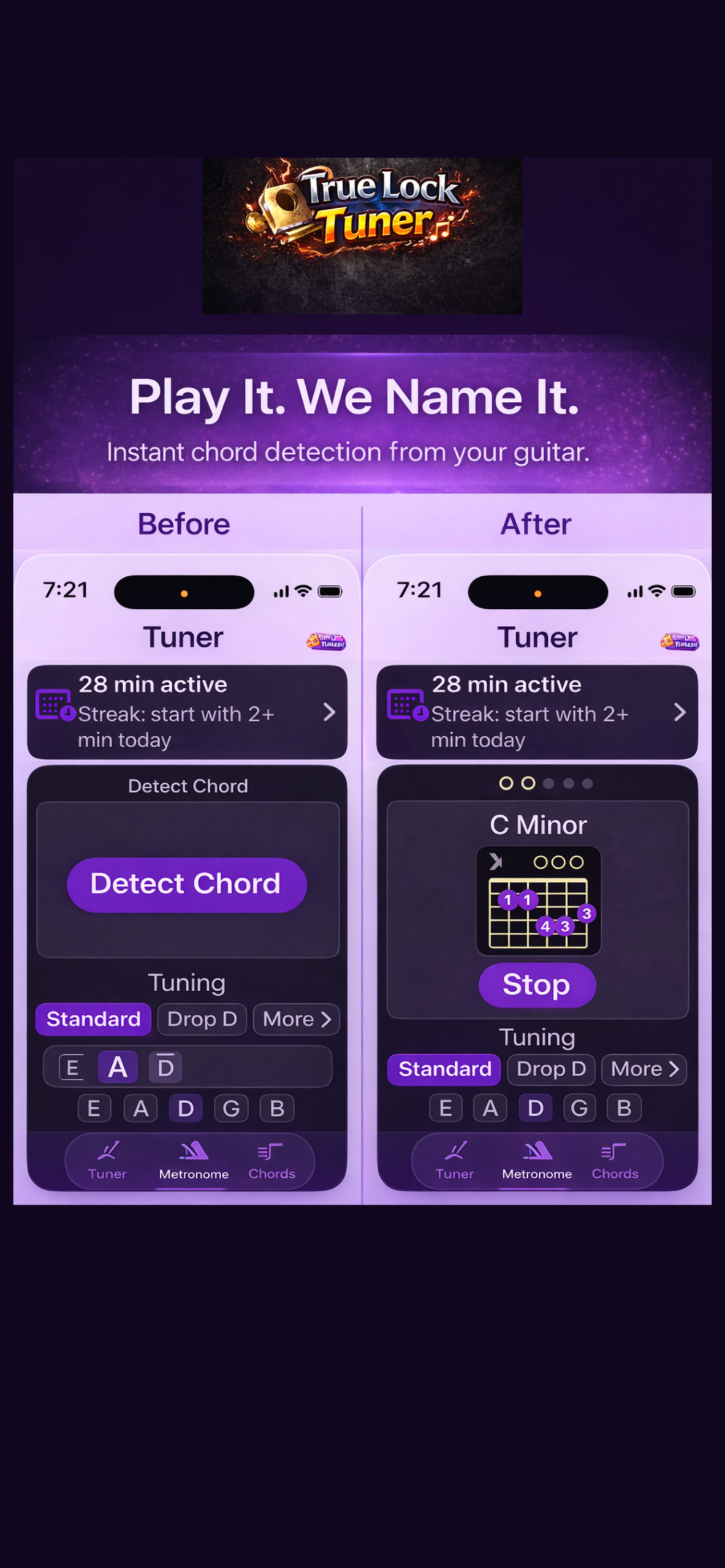
Detect Guitar Chords Instantly
Play a chord. True Lock Tuner helps name it.
The Detect Chord feature in True Lock Tuner is designed to help guitar players quickly identify the chord they are playing. Whether you are learning new shapes, experimenting with alternate voicings, or trying to figure out a chord by ear, Detect Chord gives you a simple way to connect what you play with what it is called. It is a helpful chord detector.
What Is Detect Chord
Detect Chord listens through your iPhone’s microphone and analyzes the notes it hears from your guitar. When you strum or pick a chord, True Lock Tuner works to identify the most likely chord name and display it clearly on screen.
It is especially helpful for:
Learning unfamiliar chord shapes
Checking if you are playing the right chord
Exploring new voicings
Practicing chord changes
Understanding how notes combine to form chords
Turning “that sounds good” into “now I know what that is”
How Detect Chord Works
When you tap Detect Chord, True Lock Tuner begins listening to your guitar.
As you play, the app analyzes the pitches it hears and compares those notes against known chord patterns. Once the notes are recognized, the app shows the chord name and helps you understand the result.
For example, if you play the notes of a G major chord, True Lock Tuner can help identify that sound as G Major.
The goal is not to make practice complicated. The goal is to make chord discovery faster, clearer, and easier.
How To Use Detect Chord Properly
For the best results, use Detect Chord in a quiet space and play clearly.
1. Tune Your Guitar First
Before using Detect Chord, make sure your guitar is in tune. Even slightly sharp or flat strings can make chord detection less accurate.
Start with the built-in tuner, lock in your tuning, then move to Detect Chord.
2. Play One Chord at a Time
Strum one chord clearly and let it ring. Avoid playing fast chord changes while the app is trying to listen.
Give the app a clean chord sound to analyze.
3. Avoid Background Noise
Microphone-based chord detection works best when the app can clearly hear your guitar.
Try to avoid:
TV or music in the background
Loud fans or air conditioning
Other instruments playing nearby
Talking while detecting a chord
4. Use Clean Chord Shapes
Muted strings, buzzing notes, and accidental open strings can change what the app hears.
For best results:
Press the strings firmly
Avoid unwanted string noise
Let the correct notes ring out
Mute strings that should not be played
5. Let the Chord Ring
After strumming, let the chord sustain for a moment. This gives True Lock Tuner more information to analyze.
A clean, steady chord is easier to detect than a quick or noisy strum.
Why Guitar Players Use Detect Chord
Detect Chord is useful because guitar players often discover shapes before they know the theory behind them.
Maybe you move one finger and find a chord that sounds great. Maybe you are learning from a video and want to check what you are playing. Maybe you are writing a song and need to identify a chord progression.
True Lock Tuner helps bridge that gap.
Instead of guessing, you can play the chord and get immediate feedback.
Great For Beginners and Songwriters
Beginners can use Detect Chord to confirm that they are practicing the correct chord shapes.
Songwriters can use it to quickly name chords they discover while creating riffs, progressions, or alternate voicings.
It is also helpful when experimenting with different chord positions across the neck.
Detect Chord + Chord Library
Detect Chord becomes even more useful when paired with the True Lock Tuner Chord Library.
After identifying a chord, you can continue learning how chords are built, how they look on the fretboard, and how different shapes connect together.
Together, these tools help you move from guessing to understanding.
Tips For Better Chord Detection
Use an acoustic guitar or a clean electric tone
Hold your phone close enough to hear the guitar clearly
Avoid heavy distortion or effects
Strum evenly
Make sure each note rings cleanly
Tune before detecting chords
Download True Lock Tuner
True Lock Tuner gives guitar players an easy way to tune, practice, learn chords, and improve timing — all in one simple iPhone app.
Use Detect Chord to identify what you are playing and build confidence every time you practice. Check out the chord detector function on True Lock Tuner.